
Move a full company from Sage 100 Contractor to Sage Intacct
Crossbeam is the migration tool we built for this move. It reads your Sage 100 Contractor database directly and writes into Sage Intacct through the API: chart of accounts, vendors, customers, projects, and AP and AR invoices, historical data included.
- Historical data included
- Preview before go-live
- Per-record log
- Production ready

The template route is where migrations lose weeks
The manual route is to export each data set to CSV, wrestle it into Intacct's import templates, then chase every record the template rejects. On a real company that cycle is slow, and one reformatting mistake can mean importing a whole module again.
Sage 100 Contractor runs on a SQL Server database on your own server. Sage Intacct is a cloud system with an open API that stores the same records differently. The gap between those two shapes is where a manual migration burns time.
Crossbeam reads the source directly and maps it to Intacct's structure, so the export, reformat and import loop disappears. It carries history as well as current balances, so Intacct does not start empty. Nothing is committed blindly: you review a preview before anything posts, and a per-record log shows exactly what landed.
We run the migration with you as a fixed-price project. Crossbeam is production ready, and we will show it on a copy of your own data before you commit.
Chart of accounts and GL
Your account structure rebuilt in Intacct, so the ledger lines up from day one.
Vendors, customers and projects
The master records your transactions depend on, moved with their relationships intact.
AP and AR invoices
Open payables and receivables carried across, so balances are right at go-live.
Historical data
Not just current balances. History comes along, so you do not lose your record.
What you see in Crossbeam
Three views of the Crossbeam dashboard.
-
Connected to both systems
Crossbeam reads Sage 100 Contractor directly and writes to Sage Intacct through the Intacct API. Both connections show at the top before anything moves.

-
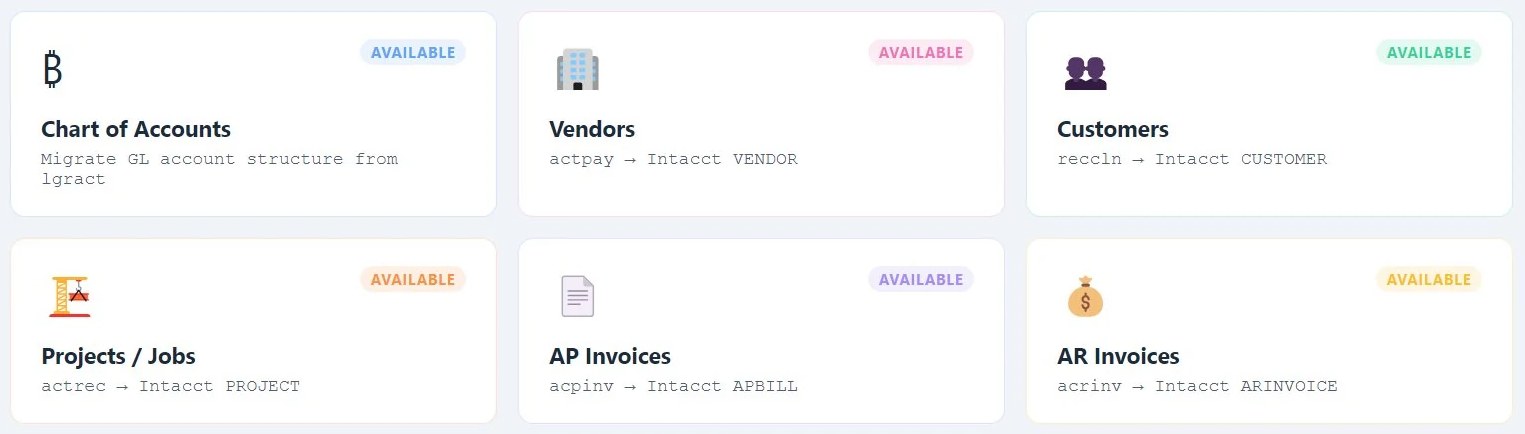
One module per data set
Chart of accounts, vendors, customers, projects, and AP and AR invoices each have their own module, mapped from the Sage 100 Contractor table to the Intacct record it becomes. Each one is previewed before it migrates.
-
Moved in order, module by module
Work down the list so master records land before the transactions that depend on them.


How a Crossbeam migration runs
Scope
We review your Sage 100 Contractor data and your Intacct target, then fix the scope and the price.
Map
Crossbeam maps your source records to Intacct's structure, validated against your real data.
Preview
You see the full migration before anything posts. Nothing is written until you are satisfied.
Go live
We run the migration, history included, and you verify the result in Intacct against a per-record log.
Six decisions to make before a Sage 100 Contractor migration
These set the scope and the price. We work through them with you on the first call, but you can start on them today.
Pick the cut-off date
Usually a month end or year end, so the opening balances in Intacct tie to a closed period in Sage 100 Contractor.
Decide how much history to bring
More years means more volume and more review time. Older years can stay in Sage 100 Contractor for lookup.
Reconcile AP and AR to the aging
The open invoices that move should add up to the balances you expect. Differences are cheaper to find before the move than after it.
Tidy the master records
Mark vendors, customers and jobs you no longer use as inactive and merge duplicates, so they do not come across as clutter.
Map the chart of accounts
Intacct reports through dimensions such as project, department and location. Decide what stays in the account number and what becomes a dimension before anything is mapped.
Name who signs off each module
One person checks each module against the per-record log before the next one moves.
Questions people ask
How do I migrate from Sage 100 Contractor to Sage Intacct?
Migrating means moving your chart of accounts, vendors, customers, projects, and open AP and AR invoices into Intacct. The manual route uses CSV exports and Intacct's import templates, which have volume and formatting limits and often reject records. The faster route is a direct migration that reads the Sage 100 Contractor SQL database and writes into Intacct through its API. Crossbeam does this, brings historical data as well as current balances, and shows you a preview so you can verify the migration before going live.
Does the migration include historical data?
Yes. Crossbeam can bring historical data across, not just current balances, so your Intacct company keeps its record instead of starting empty. How far back you carry is part of the scoping conversation, because it affects volume and review time.
How long does a Sage 100 Contractor to Intacct migration take?
It depends on data volume and how much clean-up the data needs first. The transfer itself is the part that shrinks most with the right tooling: a manual migration through CSV templates stretches out because every rejected row needs investigating. With a direct transfer through the API, the timeline is driven by planning and verification, not data entry.
What does a Sage Intacct migration cost?
It depends on data volume, the number of modules being moved and how much clean-up is needed first. Manual migrations carry heavy consulting hours because of the export, reformat and import cycle. A direct tool removes most of that labour. We scope each migration at a fixed price once the data sets and Sage versions have been reviewed.
What is the difference between Sage 100 Contractor and Sage Intacct?
Sage 100 Contractor is an on-premises construction accounting system that runs on a local SQL Server database, popular for job costing and service work. Sage Intacct is a cloud financial platform with stronger multi-entity consolidation, dimension-based reporting and an open API. Many construction businesses outgrow Sage 100 Contractor's reporting and move to Intacct, which is the path Crossbeam automates, history included.
What should we clean up in Sage 100 Contractor before migrating?
Reconcile open AP and AR to the aging reports, mark vendors, customers and jobs you no longer use as inactive, merge duplicates, and decide how the chart of accounts maps to Intacct, including what becomes a dimension. Picking the cut-off date and how many years of history to bring settles the rest of the scope.
Can we keep using Sage 100 Contractor during the migration?
Yes. Your team keeps working in Sage 100 Contractor until the cut-off date you agree with us. Trial runs go into a preview first, and the final run moves what is open at the cut-off, so there is no long freeze on day-to-day work.
See your own data migrate first
Bring a copy of your Sage 100 Contractor data and we will show you exactly what lands in Intacct, before you commit to anything.

